Skip the theory. We are going to build one genuinely useful agent together, a support agent that answers from your help docs and hands the hard questions to a human, and you will pick up every concept by doing it.

Photo: “Businesspeople planning tasks with sticky notes” by Rawpixel Ltd, CC BY 2.0
// build progress ☑ Define the job ☑ Pick a model ☐ Add your knowledge ☐ Connect tools ☐ Set guardrails ☐ Test and ship |
Six stages. By the last one you will have a working agent, and the pattern to build any other.
Most guides explain what an agent is and leave you to work out the rest. This one builds a real one with you, stage by stage. By the end you will have a working support agent and, more useful, the exact pattern to build almost any other agent by swapping a few parts. No code, no server, just a browser and clear thinking. Let us start by deciding precisely what it does.
What we are building
Every good agent starts with one narrow, well-defined job. Ours: a support agent that sits on your website, answers customer questions from your help documentation, and, when it is not confident or the issue is sensitive, opens a ticket and hands off to a human instead of guessing. That last part, knowing when to stop, is what separates a useful agent from a liability. Here is the shape of it.
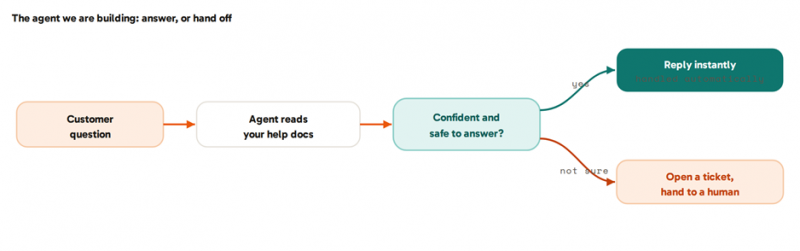
Fig. 1 · Answer the easy ones, escalate the rest
Write this kind of spec for any agent before you build: what it does, what it works from, and exactly when it should not act on its own.
01 - Pick your workshop
Open a no-code agent platform. Any of the mainstream ones can build this, and there is a comparison near the end, so just start on a free tier. Inside, you create a new agent and choose a model from a dropdown, one of the large language models such as GPT, Claude, or Gemini. That model is the reasoning engine. You are about to give it a job, some knowledge, and a few tools, and everything after this is filling in boxes.
02 - Write its brief
This is where most of your real work happens, and it is just writing. Give the agent its role, its tone, and clear rules, in plain language. Ours reads something like this:
the agent's brief (its instructions) You are the support assistant for [Company]. Answer customer questions using only the help documentation provided. Be friendly, concise, and accurate. If the documentation does not clearly answer the question, or the customer is upset, asking about billing, or requesting a refund, do not guess: apologise briefly, tell them you are connecting them to a person, and hand off. Never invent policies, prices, or promises. |
Notice how much of the brief is about what it must not do. Those boundaries are the difference between confident help and confident nonsense.
03 - Give it your knowledge
Now ground it in your facts. Upload your help articles, FAQs, policies, and product docs. The platform indexes them so the agent answers from your content instead of the model's general training. This is retrieval, often called RAG, handled for you behind an upload button. One rule matters more than any other here: the agent is only as good as what you feed it. Vague or out-of-date docs produce vague or wrong answers, so tidy them before you upload, not after a customer gets a bad reply.
04 - Let it take action
Knowledge lets it answer; tools let it act, and actions are what make it an agent rather than a chatbot. For our support agent, connect two: a ticketing tool so it can open a ticket, and Slack so it can alert your team when it hands off. Switch these on from the platform's integrations list and authorise them. Give it only these, because the fewer tools an agent has, the fewer ways it can surprise you.
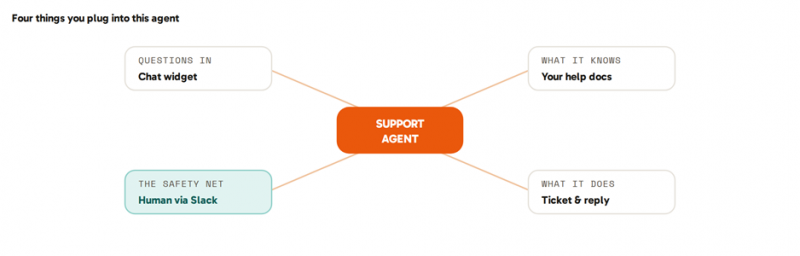
Fig. 2 · The pieces you connect for this build
05 - Set the guardrails
This is the stage beginners skip and regret. Define the line where the agent stops and a human takes over. For ours: if its confidence is low, or the question touches billing, refunds, or an upset customer, it does not answer, it escalates. Add a hard rule that it never issues refunds or changes account settings itself. The aim is simple, let it handle the easy majority and route the tricky minority to a person. Draft-and-approve beats autonomous-and-sorry every time.
06 - Test it, then ship it
Do not test with tidy questions. Paste in the messy, real ones: typos, half-sentences, angry ones, questions your docs only half-answer. Watch where it goes wrong, then tighten the brief and the docs. That loop is the actual work of building an agent. When it handles real questions well and hands off cleanly, deploy it: most platforms give you an embeddable chat widget for your site, a shareable link, or a Slack app. Then keep reading the transcripts for the first week and keep refining, an agent gets better the more real conversations you review.

Shipping is a button. The craft is in the testing loop that comes before it. Photo: “A person with curly hair is silhouetted against a large computer screen” by Nilo Velez, CC0 1.0
Now make it yours
Here is the real prize. That skeleton, a model, a brief, some knowledge, a couple of tools, and a handoff rule, is the template for almost any agent. Swap the parts and you get something new, without learning anything new.
- Inbox-triage agent. Knowledge: your labels and priorities. Tools: your email. It labels incoming mail and drafts replies for your approval.
- Lead-qualification agent. Knowledge: your ideal-customer profile. Tools: your CRM and calendar. It scores a form submission and books a call.
- Meeting-notes agent. Knowledge: your preferred format. Tools: your transcript source and docs. It summarises the call and files the action items.
- Research-digest agent. Knowledge: your topics. Tools: web search and Slack. It posts a short briefing every morning.
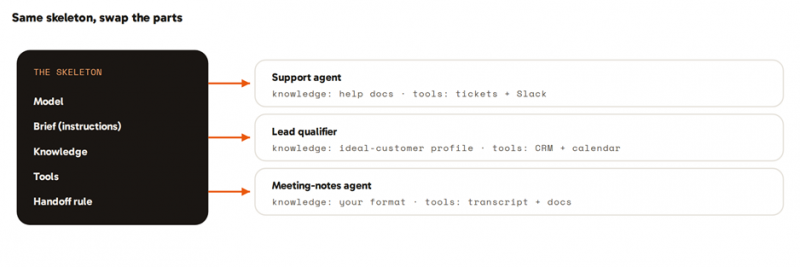
Fig. 3 · One template, four agents

Pick the most repetitive job on your team and build that one next. Photo: “Team Meeting” by Startup Stock Photos, CC0 1.0
Where builds go wrong
Agents fail in predictable ways, and a little discipline prevents nearly all of it.
Skipping the spec. A fuzzy job makes a fuzzy agent. Write the one-paragraph brief before you open a tool. |
Too much autonomy, too soon. New agents draft and suggest. They do not send money or emails unsupervised until they have earned it. |
Feeding it stale knowledge. Garbage in, confident garbage out. Clean your docs before you upload them. |
Keep a human on the hard part. The handoff is a feature, not a failure. Route the risky minority to a person by design. |
Start with one job, and measure. Ship one agent, track the time it saves, and expand only what actually works. |
Which platform to build on
Any mainstream no-code platform can build the agent above. They differ mainly in how easy they are to learn and how they charge, some a flat fee, others credits or per-task metering that grows with use. A 2026 snapshot:
| Platform | Best for | Ease | Pricing from |
|---|---|---|---|
| Lindy | Personal and email agents, fastest start | Very easy | ~$20/mo, free tier |
| Zapier Agents | Connecting the widest app stack | Easy | ~$20-30/mo, 100 free tasks |
| Make | Visual automation with more control | Moderate | from ~$9/mo, free tier |
| Relevance AI | Teams of agents, business workflows | Easy to moderate | ~$29/mo, free tier |
| Voiceflow | Customer-facing chat and voice | Easy | ~$50-60/mo, free tier |
| n8n | Maximum control, self-hosting, no per-task fees | Harder | free self-host, ~$20+/mo cloud |
Pricing and models change fast in this space. Verify current plans before committing.
You just built the pattern
You built a support agent, and with it the mental model for building any agent without code: define the job tightly, give it a brief and your knowledge, connect a couple of tools, decide where it must hand off to a human, and test it on real, messy input. The platforms will keep changing and the models will keep improving; that pattern will not. Pick one repetitive job in your week, open a free tier, and build the next one this afternoon.
Post Comment
Share your thoughts about this article.
Be the first to post a comment!